Originally published Aug 2023 on the Splitgraph engineering blog. Restored here in Oct 2026 with minor formatting/edits.
We return to the wide world of WASM. In our previous round we implemented a UDF using Rust; today we’re porting it to Golang.
Seafowl has supported UDFs for some time now, and they continue to offer an exciting way for Seafowl users to significantly extend functionality in a fully sandboxed environment. Recently, in response to user request, we added a Golang example.
To learn more about compiling Golang to WASM, read on.
Handling UDF requirements
There are certain requirements incumbent on the UDF implementer when it comes to running UDFs in Seafowl, and Golang is included. Today we cover a partial list:
reading data in from the host through linear raw memory
returning the computed result as a msgpack-encoded buffer
working around Golang default syntax (e.g. TitleCase function exports)
compiling Golang into WASM
Reading data in
As discussed previously, when you register a Seafowl UDF it’s required to specify certain parameters including e.g. wasm_export (e.g. addi64), return_type (e.g. BIGINT), input_types (e.g. BIGINT).
This is important because raw memory is the medium for passing data between Seafowl and the UDF. By specifying the parameter types upfront at UDF registration time, both Seafowl host and UDF know how to properly encode/decode the data they share with each other. That’s why the function addi64, expects a pointer to a buffer vs conventional Go function params.
Writing data out
Conversely, when we return the result to Seafowl, we need to return a buffer that includes the length of the result first, with the actual msgpack-encoded result appended afterwards.
This allows Seafowl’s query engine to return the result of the UDF in the typical way.
TitleCase function export workaround
Golang conventionally uses TitleCase to indicate when a function should be exported from its module scope. Some may find it cute and this convention is part of traditional Golang, but in certain contexts like UDFs, we are required to provide alloc/dealloc functions in lower case – which poses a fun hurdle.
Fortunately, while researching how tinygo works, I learned it supports annotating functions regardless of casing via //export $functionName
And Seafowl will be able to call this function in the required way.
Compiling Golang into WASM
In August 2023 the Golang team shipped WASI/WASM support, so the following approach we used may no longer be strictly necessary these days.
When we tackled this project, Golang did not yet support WASM natively so looking elsewhere, we found Tinygo.
It turns out we can generate a WASM module ready for import into Seafowl via: tinygo build -o seafowl-udf-go.wasm -target=wasi
NOTE: it’s necessary to include -target=wasi.
Recap
In this post we reviewed some of the steps taken to port the Rust-based UDF into Golang. This was my first Golang project and I appreciated the opportunity to work with raw memory, and operate at a lower level, learn about byteslice manipulation, msgpack serialization, WASI and more.
Originally published May 2023 on the Splitgraph engineering blog. Restored here in Oct 2026 with minor formatting edits.
Learn how to combine Seafowl with GCS FUSE to achieve true scale to zero. Serve users at the edge with a web (HTTP)-first analytical database that works on GCP Cloud Run, including within the always free tier.
Introduction
Seafowl is a new analytics database based on DataFusion and delta-rs, designed for running at the edge and serving queries over HTTP with cache-optimized responses. Because it separates storage from compute, it’s an ideal candidate for running in serverless environments. In this post, we’ll explore the architecture behind Seafowl and demonstrate how to deploy it to Google Cloud Run (GCR) as a true scale-to-zero serverless database that doesn’t require any persistent compute resources, and can query data stored in Google Cloud Storage (GCS), while minimizing cold-start times.
Why do we need a serverless database?
A key advantage of serverless applications is that each instance of an application can execute in a region close to the user requesting it, without the need to provision a server in every region ahead of time. But there’s a catch: for most use cases, the application is bottlenecked by the database, which generally does require provisioning a persistent server ahead of time. This can mean sacrificing the main benefit of serverless, as every cache miss needs to query a single master database in an arbitrary region, regardless of how close to the user the HTTP server is executing.
Seafowl solves this problem for analytical workloads, by accepting certain tradeoffs that might be less acceptable for transactional databases, in exchange for fast and cacheable responses to read queries. For example, as an OLAP database, Seafowl assumes that data is loaded into it periodically, and it’s generally okay to return stale data while loading new data into it.
Why Seafowl?
Seafowl separates compute and storage of the data it queries. It makes data in object storage queryable by a Docker image (binary also available), and maintains its internal catalog by writing to a SQLite file. This makes it easy to deploy as a serverless function to any platform that can run Docker images, like Google Cloud Run1. With Seafowl you can expect a fast init time (e.g. 10ms), and configurable/optional dependencies keeping you in control of which tradeoffs make sense for your situation.
Another perk: because Seafowl offers a CDN-friendly HTTP story, if your data is suitable for caching your end users will likely further benefit if you choose to front with e.g. CloudFlare or similar CDN providers.
What’s the challenge?
The challenge is avoiding cold starts, while also avoiding the need for a persistent node for storing metadata. The Seafowl architecture is divided into three parts: compute (e.g. the binary, deployed in e.g. a Docker image); storage (the blob data in Object Storage); and a catalog (the metadata and information schema for the database). Compute and storage map naturally to services like GCR and GCS. But for the catalog, it’s less clear. Seafowl supports writing catalog metadata to either a Postgres database, or a SQLite file. A Postgres catalog supports multiple writers, making each Seafowl instance able to act as a reader and a writer. This comes at the cost of requiring a persistent node (options like Neon2 exist, but in our testing, the latency was unacceptable as it caused cold starts of multiple seconds). A SQLite catalog can be bundled with the image, but at the cost of being able to actually persist Seafowl writes.
Is there a way we can get the best of both worlds? With GCS FUSE, we can come close. That’s what we’ll explore in this post. We’re going to deploy Seafowl to GCR, and mount its catalog as a SQLite file on the FUSE filesystem backed by GCS. The end result is a serverless database that can respond to read queries from any region, with start times on the order of 10ms.
Goal
In today’s post we show you how to stand up serverless Seafowl on Cloud Run.
GCP offers an always free tier which may cover both your storage and compute needs. This HOWTO seeks to stay within those limits, so you are likely to have low or possibly zero costs. Either way, this guide sequesters all resources we create here into a dedicated GCP project for easy cleanup.
After installing gcloud, login to your Google account.
gcloud auth login
Create a new project (optional, suggested).
gcloud projects create $PROJECT_NAME
Create in progress for [https://cloudresourcemanager.googleapis.com/v1/projects/seafowl-gcsfuse].
Waiting for [operations/cp.6073745129322302465] to finish...done.
Enabling service [cloudapis.googleapis.com] on project [seafowl-gcsfuse]...
Operation "operations/acat.p2-124549755242-c3e8de2b-a6fa-4a73-aaa1-ad949f26e7cb" finished successfully.
ℹ️ In case you get an “already in use” error, please choose a unique name. Consider appending some randomness and use export PROJECT_NAME=YourName to refer to it through the rest of the commands).
Set your project and region
Creating resources in the same region gives best performance as well as helps avoid cross-regional networking charges.
gcloud config set project $PROJECT_NAME
Updated property [core/project].
gcloud config set run/region $REGION # e.g. us-east1
Updated property [run/region].
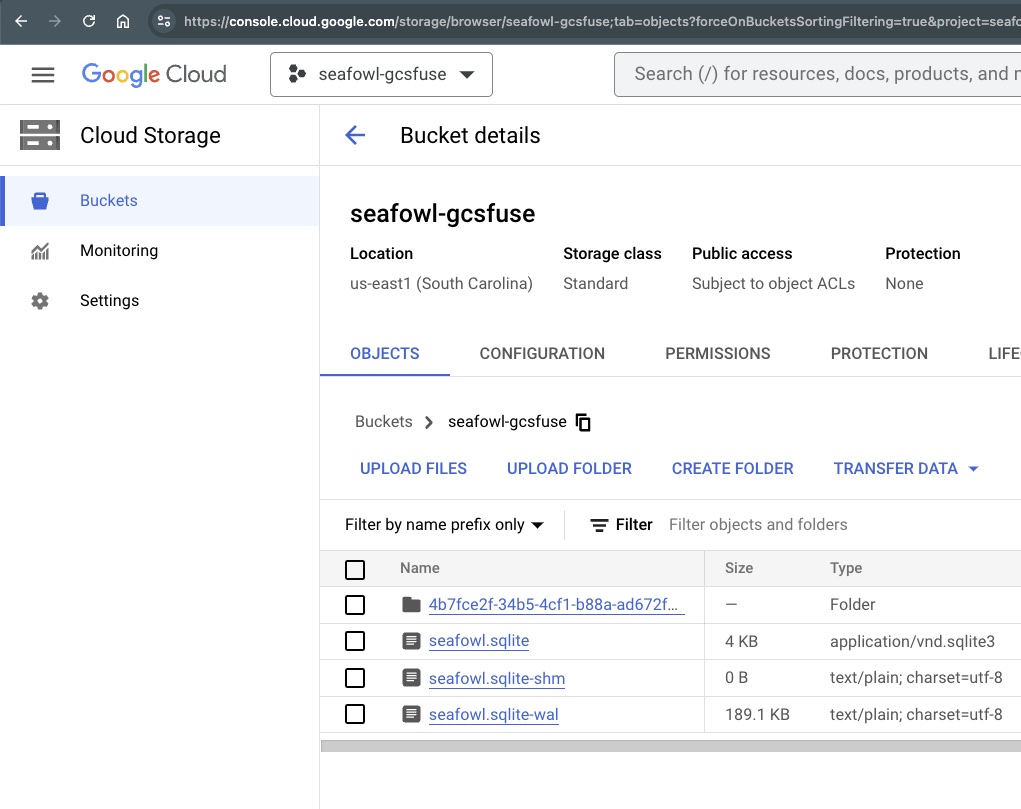
Create a bucket
This bucket will be mounted as a pseudo-filesystem inside Seafowl’s container.
ℹ️ Cloud Storage bucket names share a global namespace. Similarly to the project name, in case you encounter e.g. “The requested bucket name is not available”, please pick a unique name and export BUCKET_NAME=MyBucket.
Setup up Seafowl’s config + credentials
Seafowl can be configured via seafowl.toml. We persist it in GCP’s Secret Manager so it can be mounted in our function.
[object_store]
type = "gcs"
bucket = "$BUCKET_NAME"
google_application_credentials = "seafowl-data/seafowl-gcsfuse.json"
[catalog]
type = “sqlite” dsn = “seafowl-data/seafowl.sqlite”
NOTE: The Secret Manager is also suitable for this file. In the interest of keeping a lid on costs we only save one secret. By mounting seafowl-gcsfuse.json via GCS Fuse, it’s provided to Seafowl before it starts.
Establish least privilege permissions We create a service account so that minimum needed permissions are sequestered into their own identity.
gcloud iam service-accounts create seafowl-gcsfuse-identity
Add a binding for object storage and accessing secrets.
gcloud run deploy seafowl-gcsfuse \
  --image splitgraph/seafowl-gcsfuse:latest \
  --execution-environment gen2 \
  --allow-unauthenticated \
  --service-account seafowl-gcsfuse-identity \
  --update-secrets=/app/config/seafowl.toml=seafowl_toml:latest \
  --update-env-vars BUCKET=$BUCKET_NAME

API [run.googleapis.com] not enabled on project [814934642383]. Would you like to enable and retry (this will take a few minutes)? (y/N)?  y

Enabling service [run.googleapis.com] on project [814934642383]...
Congrats! 🎉 You have a scale to zero, web (HTTP)-first analytical database, deployed to the edge. Ready to load up with whatever data you want, and ready to be fronted by a CDN.
Optional Follow Up
Two bonus ideas for consideration:
For public & production deployments, a common next step is controlling who can write vs read. Consider deploying two functions: read-only for public access and write-enabled which is only available to trusted parties. Setting read-only can be done by providing env varSEAFOWL__FRONTEND__HTTP__WRITE_ACCESS=off and RUN_SEAFOWL_READ_ONLY=trueinfo.
If your data is public, and your users would benefit from better latency, consider fronting the Cloud Run endpoint with CloudFlare. The CloudFlare CDN offers a convenient and powerful way to cache query results.
Not your preferred cloud provider? Let us know if you’d like to see a Lambda or Container Instance version of this post. ↩︎